Bringing Digital Transformation into Engine Rooms
Field data collection is critical for predicting engine failure in industrial maintenance. However, the current process relies on paper forms in loud, greasy engine rooms, making the data prone to damage and requiring tedious double-entry.
This project was part of a Digital Transformation program at Wärtsilä Marine, aimed at digitizing field data collection for engine maintenance.
Timeline
2025 | 6 months
The Team
Development Manager, Product Owner, Field Engineers
My Role
Field Research, Industrial UX
What field data am I talking about?
When a component inside an engine is removed, one aspect of checking its condition is through measurements: checking the wear and tear through changes in length, diameter, and so on.
These numbers, often in millimeters, matter. A lot. Yet these crucial measurements are still recorded on paper.
The starting point (For me)
The process development team had already begun developing a browser-based tool that would provide an alternative to paper forms.
The idea: instead of writing on paper, engineers could enter data directly into their laptops.
However, the development mainly focused on the destination of the data and the creation of the digital forms. My role was to focus on the origin (the engineer). So this led to some questions:
What would engineers actually want to use?
Would a mobile app make more sense? (We thought so)
Those questions became the starting point of my research:
What kind of user interface would improve the usability and user experience of Field Service Engineers in manual data collection system?
What did I do?
Analyze Internal Materials
To dive into the complex world of engine maintenance process, I went through every powerpoint shared with me. I needed to understand how engineers are assigned the job, how they find measurement forms, how the data comes in, where it is stored, and the business processes behind it.
Investigate what happens on the field
I conducted semi-structured interviews with 7 engineers. Going to the engine room would have been ideal (and kind of cool) but that required safety trainings, offshore clearance, and few permissions from the upper management (which was difficult in the timeframe).
Nevertheless, engineers shared stories, frustrations, and I even asked them to share photos from their workplaces. My way of “visiting” the engine room remotely.
And what did I find?
The current workflow
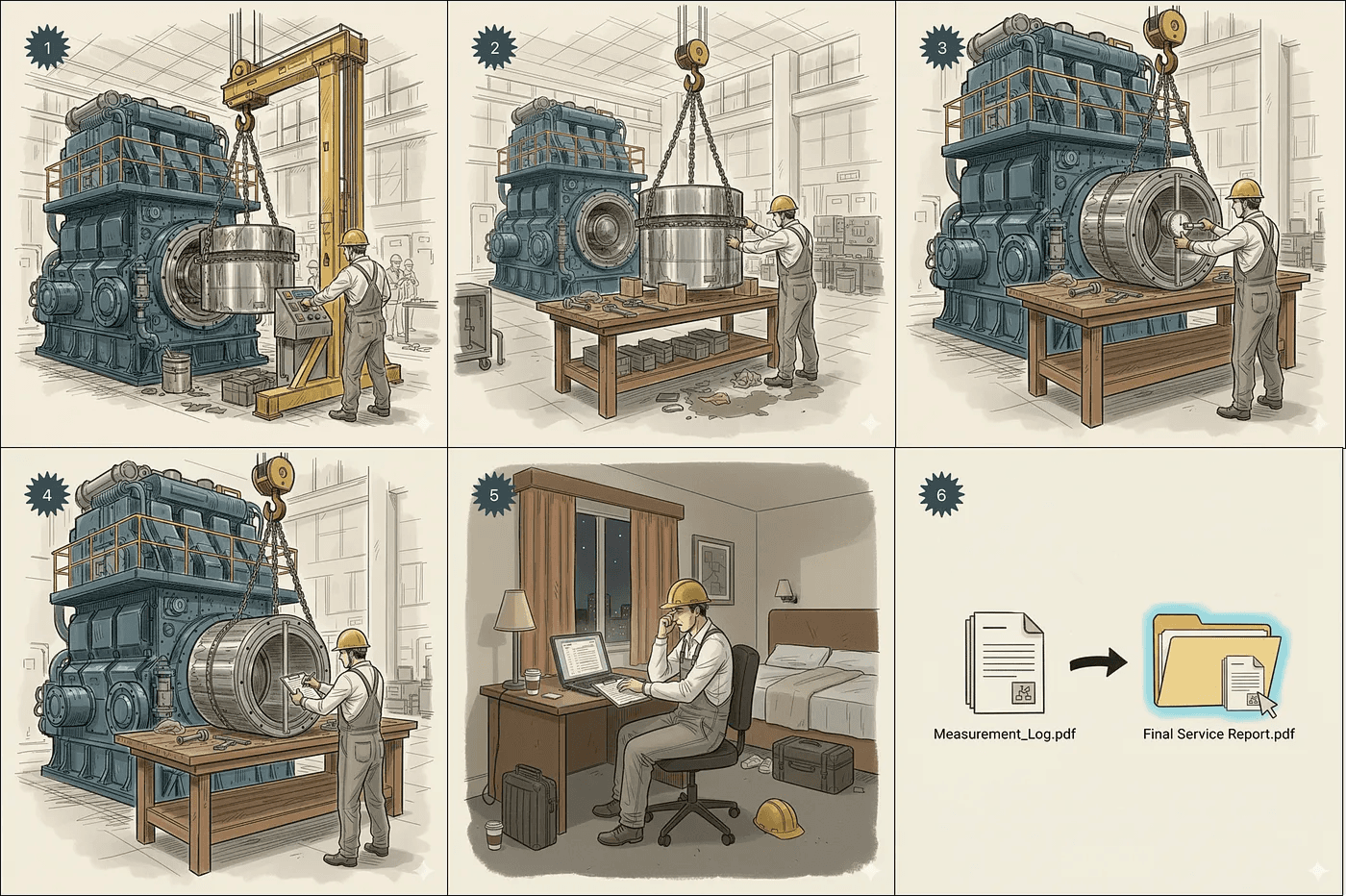
Generated with Gemini for illustrative purposes
The typical workflow today looks like this:
Remove component from the engine (camshafts of bigger engines can weigh more than 80kgs)
Place it on a flat surface (if you find one)
Use measurement tools like calipers and gauges
Write values on a paper form
Later, type all those numbers again into a PDF on a laptop so that the analysis can happen
Save and attach it to the final service report.
And there’s more, even before the job starts.
Why paper fails in the field
Paper doesn’t perform well inside an engine room. It picks up grease, dirt, and is difficult to handle. If you lose the form, you lose the data. And then all those measurements? You do them again.
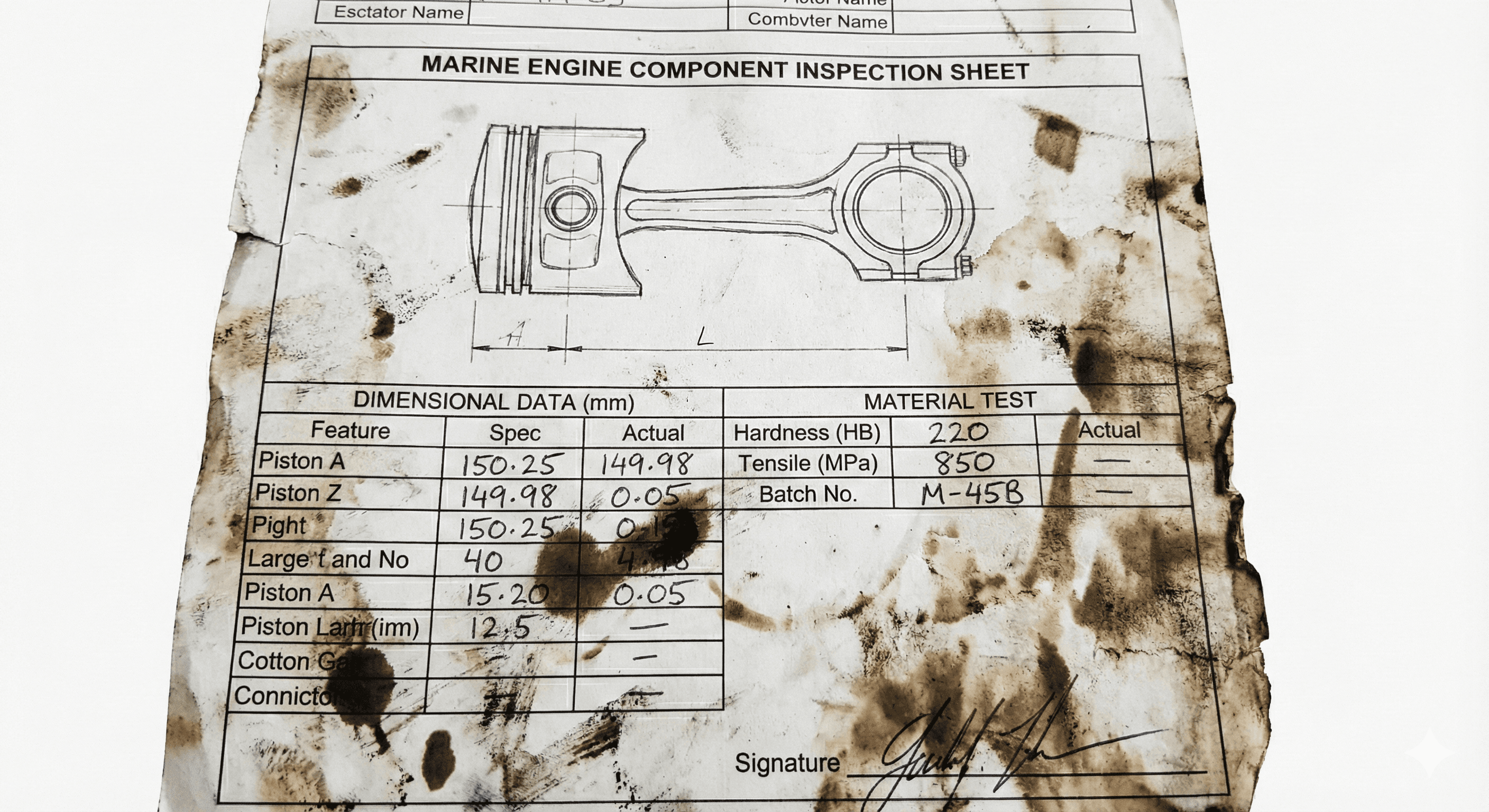
Generated by Gemini
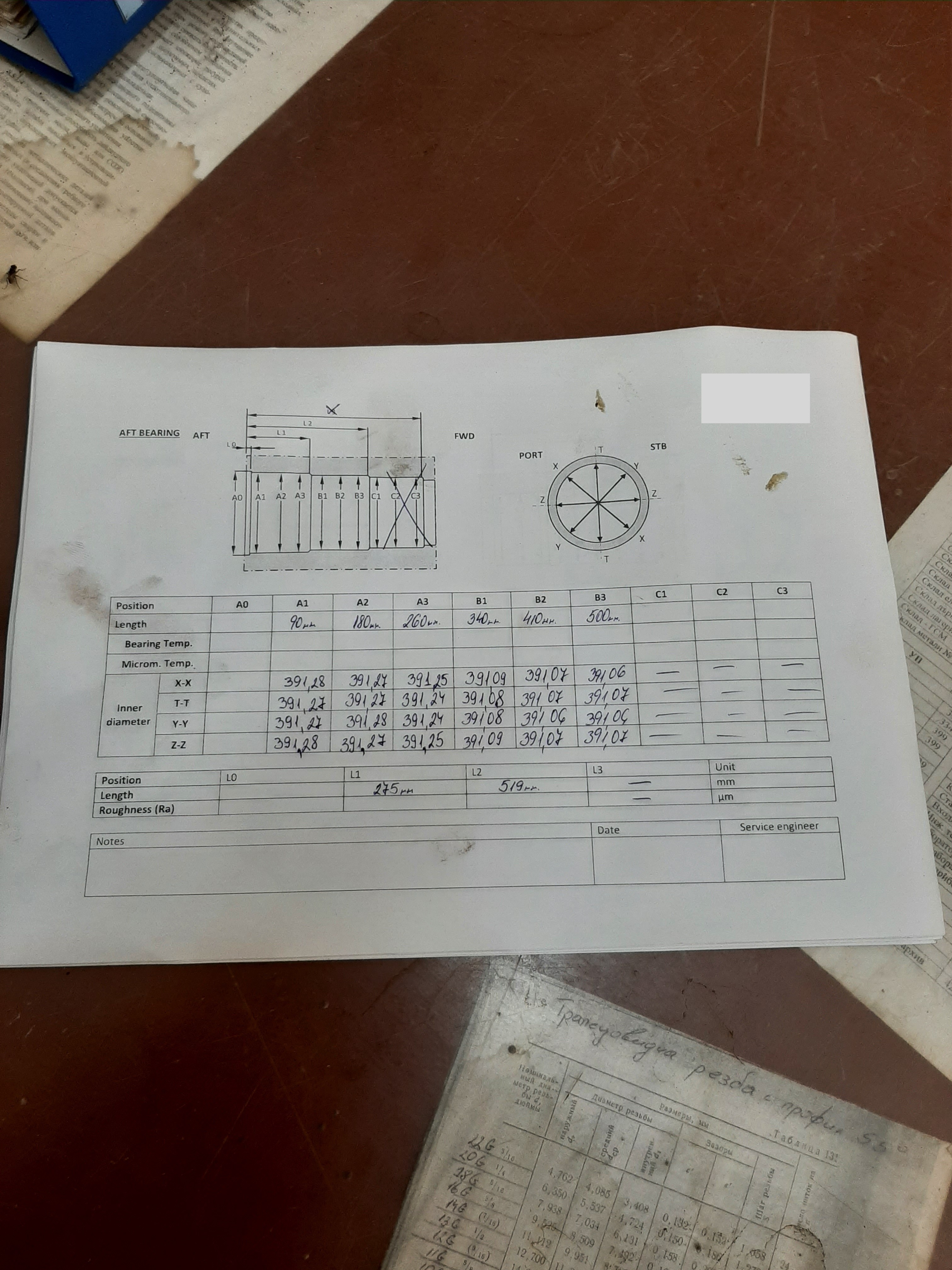
Paper form collected from engineers
But that’s not even the main problem. Having to rewrite all these values again in a pdf is a daunting task.
An interesting observation
One engineer even started writing measurements directly onto the component and took a picture to avoid losing them. Practical, clever and a huge sign that the things needed to change.
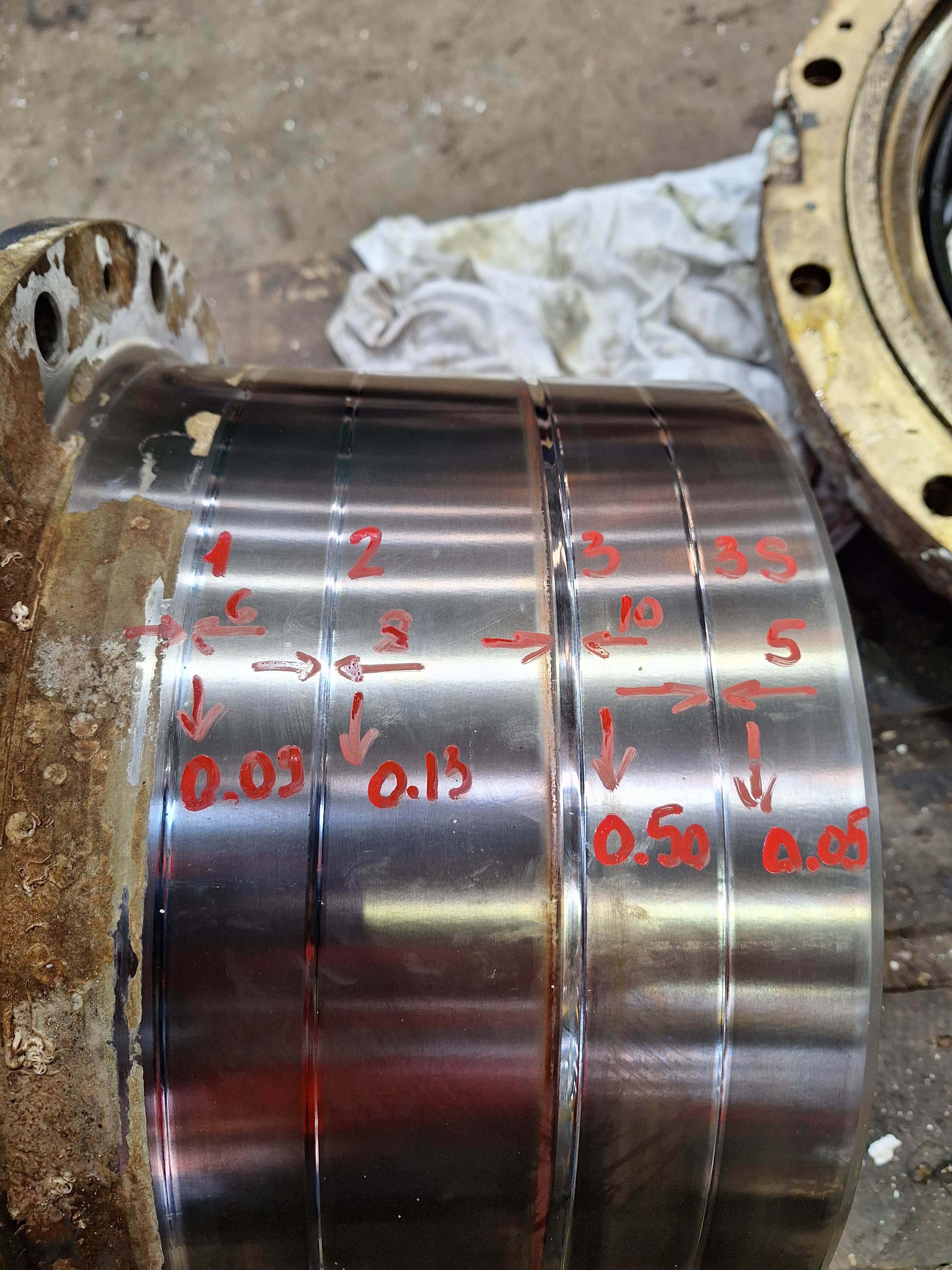
Engineers want accuracy
Some measurement forms included written instructions and diagrams, but these weren’t always clear. They could be interpreted in different ways, meaning two engineers might take the same measurement differently. That’s a huge red flag for data accuracy.
Engineers had some ideas:
"The program can also tell what points to measure by having some sort of animation. It can be a simple animation or a video on how to measure the component. This can be helpful also to someone who doesn’t have much experience at this task.”
Field Service Engineer
This told me that
Engineers are already committed to data quality.
They just need tools that respect their environment.
Laptops don’t really work in engine room
The initial browser-based system wasn’t a bad one. It fixes the rewriting step. But, the system only worked on PC and laptops.
But during the interviews, every engineer said the same thing:
"We don’t take our laptops into the engine room.”
Field Service Engineer
Laptops are bulky, fragile, and demand constant care in an environment where focus should be on the engine.
Meanwhile… Smartphones do go into the engine room (except a few offshore sites where they are prohibited for safety). Engineers use them constantly to take pictures.
Shaping the Digital Solution
The Device
Smartphones felt too small for precise data entry; laptops were too cumbersome. Tablets became the middle ground, portable yet capable.
When available, engineers prefer them because:
The screen is large enough for entering data.
They can still carry or hold them one-handed.
The Location
The environment provided clues for the interface:
Challenge: Greasy hands and gloves
Opportunity: Minimal physical interaction
Challenge: Low lighting or glare
Opportunity: High contrast
Challenge: Engineers focused on the measurement task
Opportunity: Sequential, one-value-at-a-time flow
Challenge: Possibility of errors on paper
Opportunity: Inline data validation
The Interface
The prototype grew into a tablet interface built around a two-panel layout.
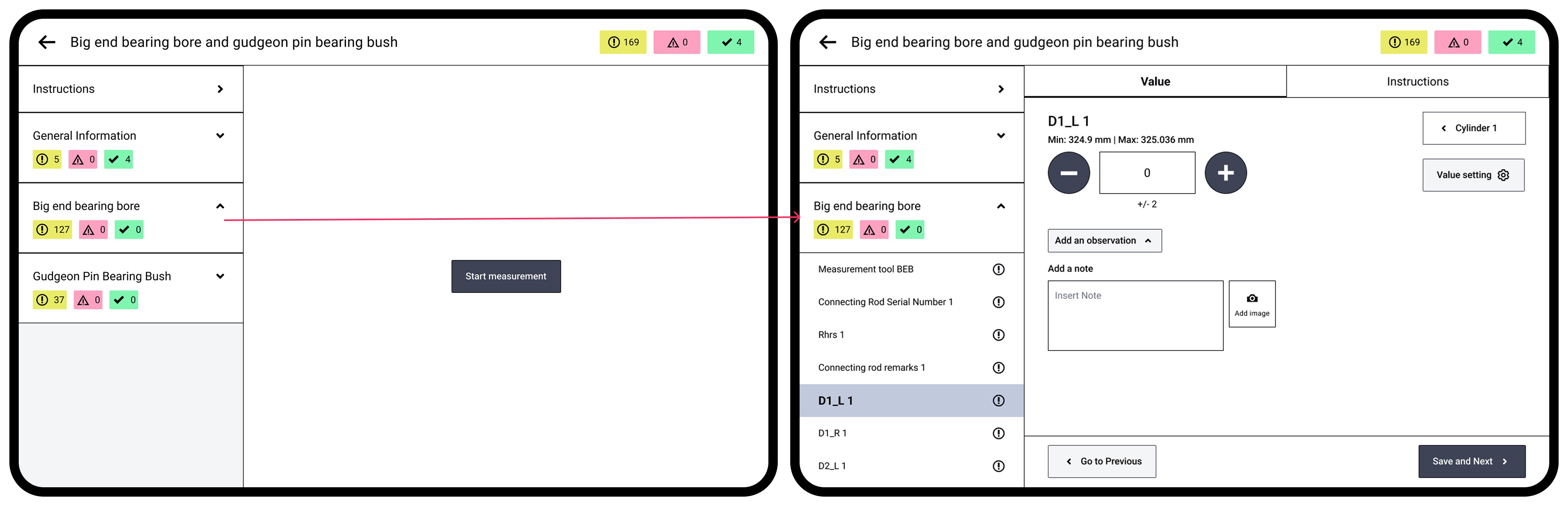
On the left, engineers can view all measurement fields structured into pre-defined sections by the Technical Team (remember sequential data entry). On the right, only one field appears at a time, reducing visual clutter and making sure the numeric keyboard never hides important information. And tapping on “Save and Next” changes the measurement field, reducing some physical interaction.
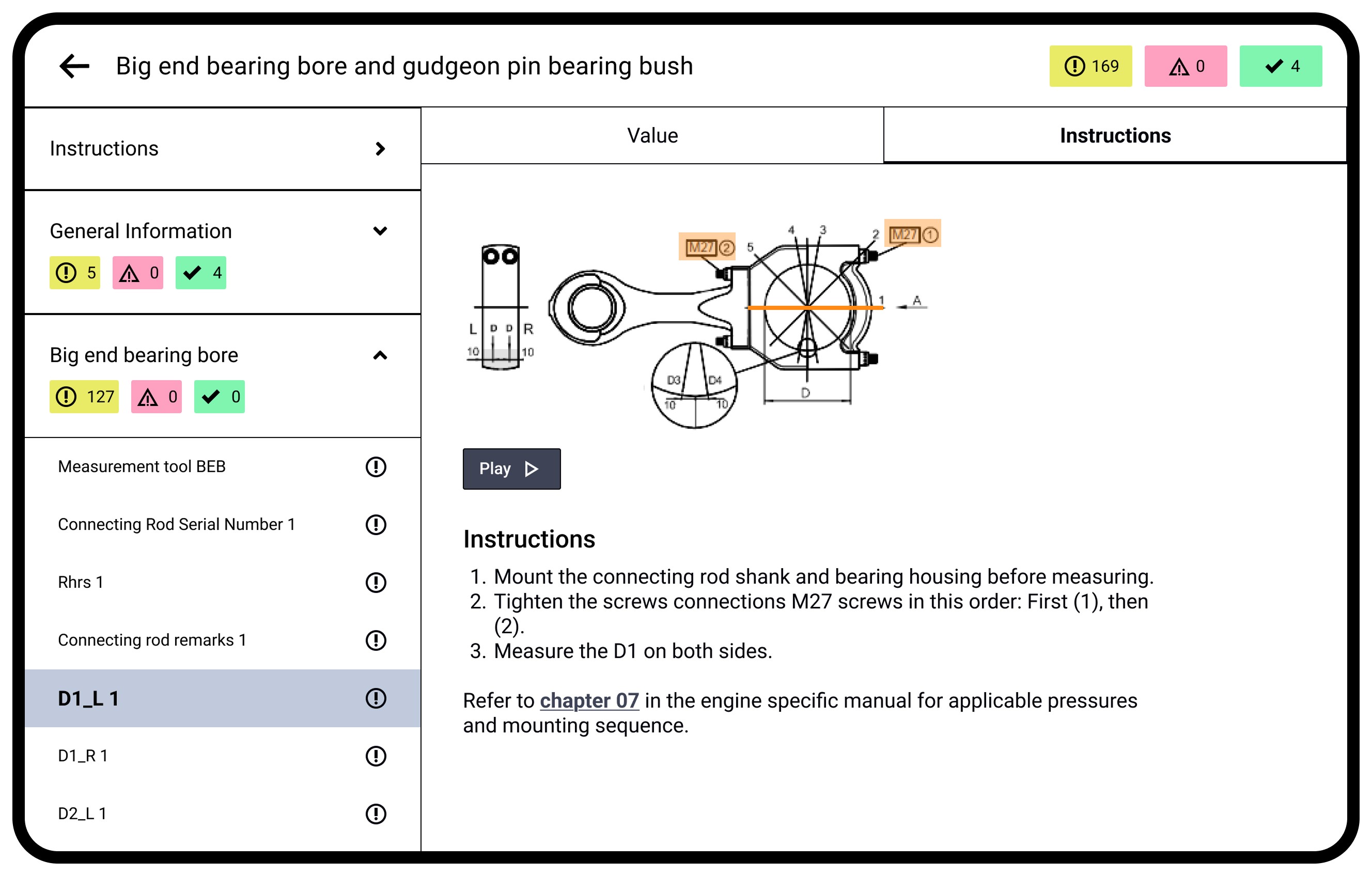
Instructional videos can be directly embedded in the app. The videos are displayed on a separate tab as engineers do not always require it and the value entry area should be distraction free.
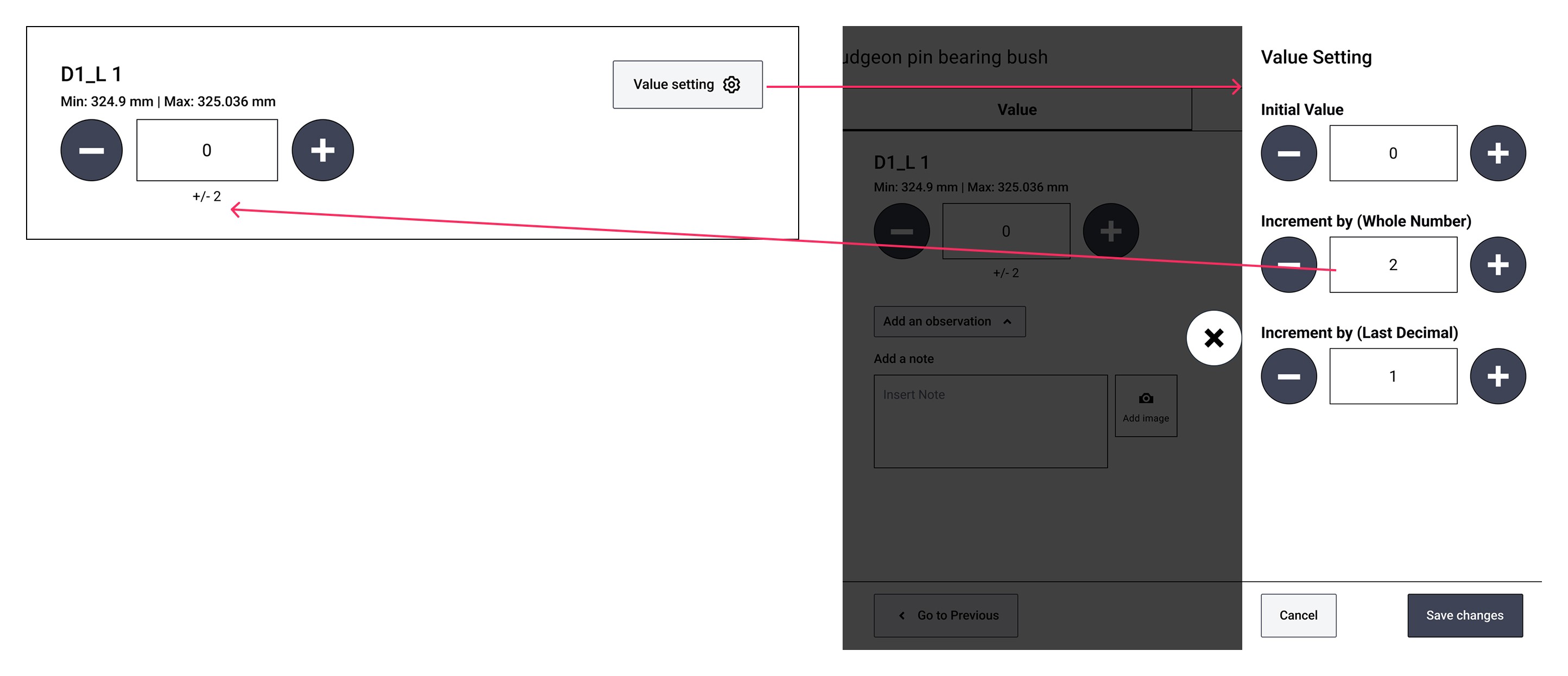
Preset increment/decrement buttons
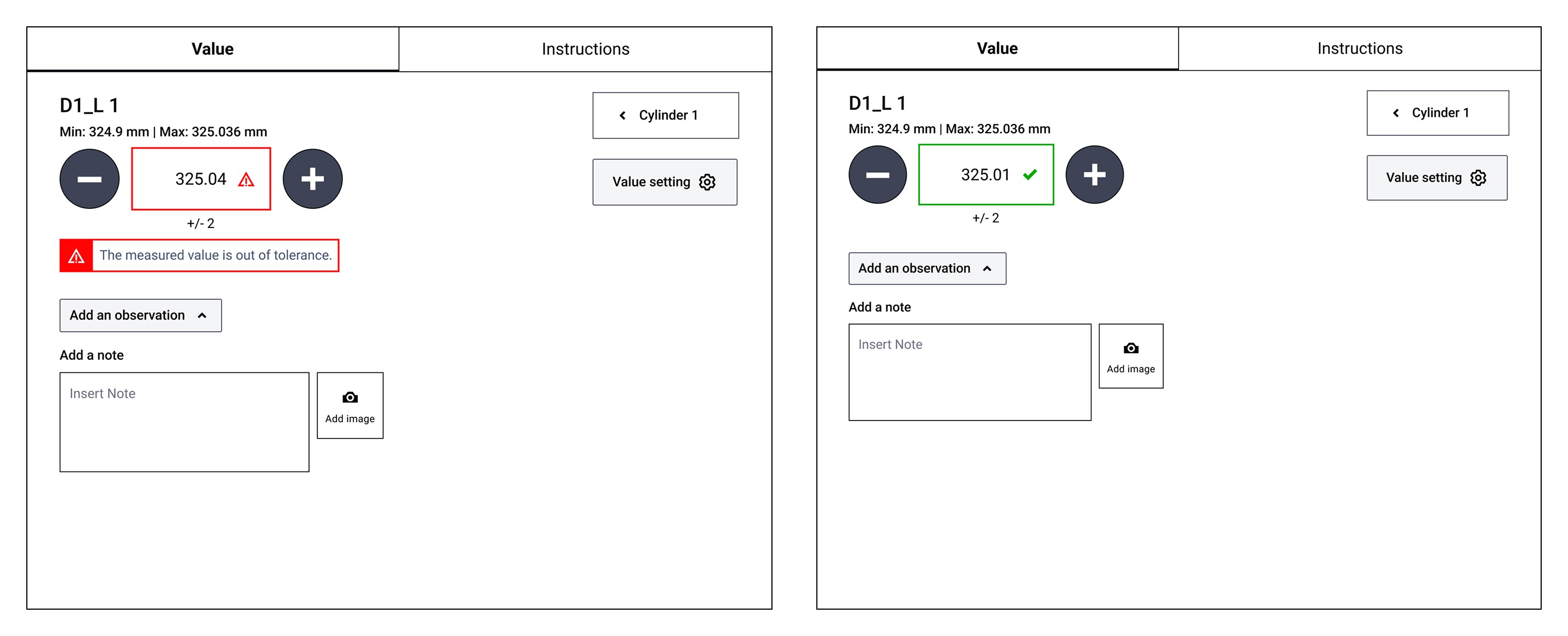
Inline data validation
During the creation of the mockups, I tried to reduce the physical interaction:
Single-tap interactions over drag-and-drop, scrolling, or long-press gestures
Predefined data from order information
Checkboxes, toggles, and radio buttons instead of typing
Numeric keyboard appears automatically when needed
Sequential flow reflecting real world work sequence.
Why we stuck to touch?
According to the literature, direct manipulation isn’t ideal for field contexts.
Direct manipulation (pointing, dragging, selecting) demands visual attention and fine motor control, both of which are often compromised in the field.
I explored other alternatives with engineers:
Voice-input?
Voice-based input method can be an alternative instead of typing the values. It is hands-free and convenient — maybe an ideal input method.
However,
The noise in an engine room can make voice recognition unreliable
Language accents vary across global teams
Mapping spoken commands to the correct input field would quickly become chaotic
"For example, you have to measure different points like 12345 across ABCD in a component. So then you would have to say A1 and then the number A2 and so on which is messy.”
Field Service Engineer
IoT measurement?
Another appealing idea from an engineer was digital tools that measure and automatically send data with a click of a button.
Point at the component -> Get the measurement on the device -> Click a button -> send it to the database.
But,
They are too costly for large-scale rollout.
Often does many things… but none exceptionally well (An insight by an engineer)
No screen at all?
I looked at academic concepts like MAUIs (Minimum Attention UI) to see if we could go screen-free. One example (Pascoe, Ryan, Morse, 2000) overloaded all input to just two hardware buttons, making the interaction simple, tactile, and usable even without looking.
These techniques are exciting because they acknowledge the same truth that emerged from my research: in field environments, the screen should never become the main focus. All attention must remain on what the hands are touching not what the eyes are reading.
But direct input still seemed like a better technique overall.
Accuracy and data quality are two important aspects in measurement work, and direct input methods are more reliable than alternatives like voice input.
It is simpler and faster to develop and fits time and budget constraints.
A tradeoff — but a practical one.
What did I learn?
Digital Transformation isn't about chasing new tech
It’s about understanding the context and evolving thoughtfully. Paper forms are familiar to engineers. Digital tools must respect that familiarity. The browser-based system, by mimicking paper, made for a good start. Tablets and direct input can take that further and eventually bridge towards more advanced or “cool” technology.
Contextual Inquiry is powerful
Contextual inquiry like observing engineers while they work, is the most powerful way to uncover the unspoken parts of a task: awkward posture, improvised techniques, first-hand experience of the environment. Interviews gave me answers. Context would have revealed behavior.
Importance of usability and user experience
Usability and user experience need to be taken seriously for internal systems as well. When it comes to critical tasks like data collection in dynamic environments, design directly impacts accuracy, efficiency, and trust.